 Statiks
Spotify keeps track of every song you play, but it doesn’t tell you the number. The number you see below many songs is a different one. Here’s what it means and how to find out how many times you’ve played a song yourself.
The number below a song isn’t yours
On Spotify, many songs show a number, for example on an artist’s page next to their most popular songs. It shows how often the song was streamed by all listeners worldwide, not how often you played it. For songs with fewer than 1,000 plays, Spotify doesn’t show an exact number.
So if you want to know how many times a song has been streamed in total, that’s the number. How many times you played it isn’t normally shown anywhere on Spotify, neither in the app nor on the web.
What Spotify shows you about your own listening
Spotify itself only offers look-backs:
- Wrapped: once a year, in early December, with your top songs from January 1 to about mid-November.
- Weekly stats in your profile: your top songs and artists of the last four weeks.
- Spotify 20: for its 20th anniversary in May 2026, Spotify showed your 120 most played songs of all time with play counts once, plus a playlist in your library. It was a one-off campaign and only covers your top 120 up to that point.
They show your favorites for a fixed period. How often you played a particular song, up to today and over a period you choose, isn’t part of them.
Option 1: Go through your Spotify history yourself
Spotify keeps every stream since you created your account and gives you the data on request. In the extended streaming history, every stream is its own entry with the song, the artist and how long you listened. To count yourself:
- Request your extended streaming history from Spotify. It takes up to 30 days. The guide to your Spotify listening history shows how.
- Open the JSON files from the ZIP, for example in a text editor or with a small script.
- Count your song’s entries (field
master_metadata_track_name) wherems_playedis at least 30000, so at least 30 seconds.
It works, but it’s tedious: the history is split across several files, and you start over for every song.
Option 2: Let Statiks count for you
Statiks is an independent app for iPhone and Android that connects to your Spotify account. On every song’s page, you see:
- how many times you played it,
- how many hours that adds up to,
- since when you’ve been listening to it and how that changed over the years,
- how far it is to the next milestone, from bronze after 10 streams to diamond after 1,000.
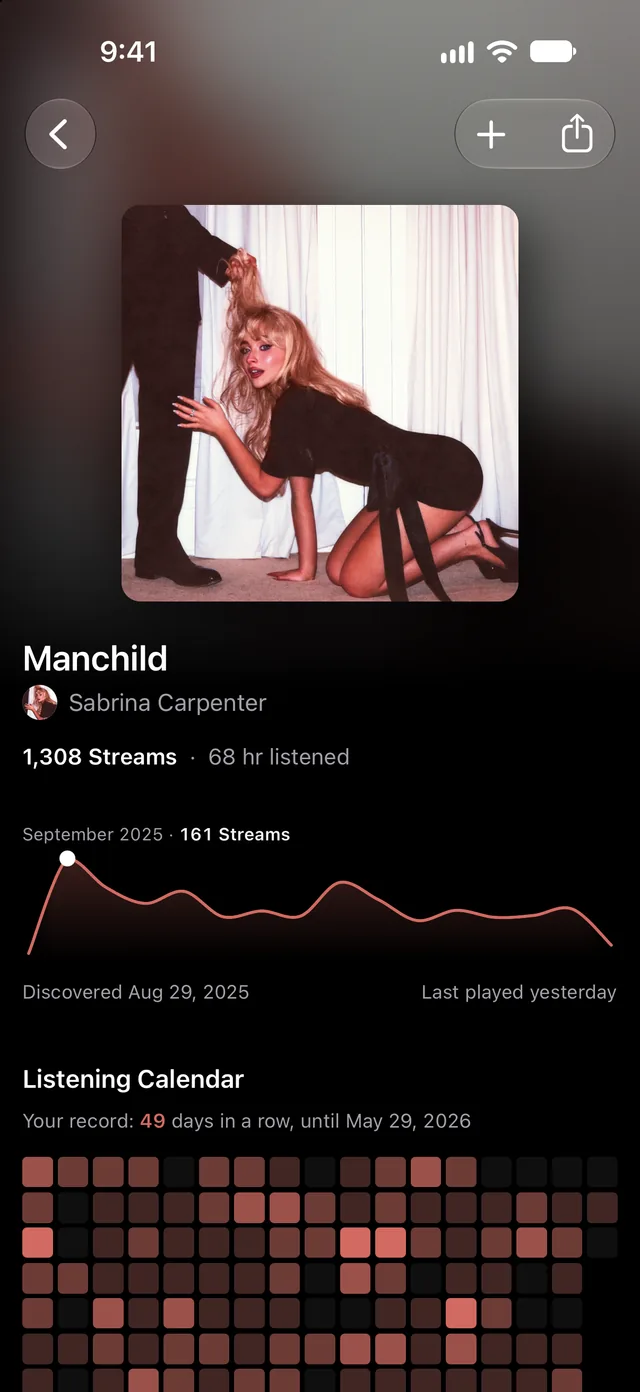
Stream counts are part of Statiks Plus. Plus counts every stream from the moment you get it. For everything before, you import the extended streaming history from option 1, as the ZIP Spotify sends you. Then the count goes back to your very first stream. For free, you see your Top 50 songs, artists and albums for Spotify’s own ranges, but without numbers.
When does a stream count?
Spotify counts a stream once you’ve listened to a song for more than 30 seconds, and Statiks counts the same way. Play a song ten times in a row on repeat, and that’s ten streams. Skip after a few seconds, and it doesn’t count.
Frequently asked questions
Can I see how many times someone else listened to a song?
No. Spotify doesn’t show other users’ play counts. The number Spotify shows next to a song, for example among an artist’s most popular songs, isn’t about one person: it adds up the plays of all listeners worldwide.
How many times did I play a song in a specific year?
In Statiks Plus, you pick any period, for example a calendar year, and see the streams of every song in that period.
Do I need Spotify Premium?
No. Every Spotify account can request its data export, and Statiks works with Spotify Free and Premium.
Spotify is a trademark of Spotify AB. Statiks is an independent app and is not affiliated with Spotify.